
Pentair IntelliFlo i1, i2, VSF / IntelliPro / WhisperFlo VS Pumps
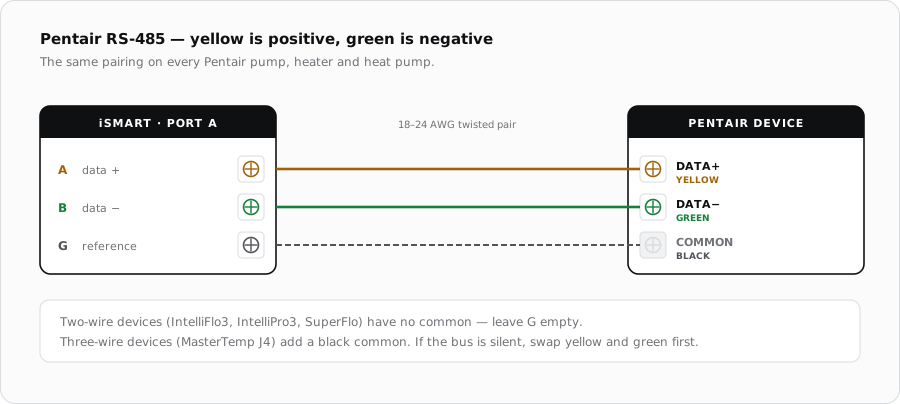
The earlier IntelliFlo family connects on the same yellow and green pair as the current generation. The difference is on the keypad: these pumps need an address and a mode set before they will answer a controller at all.
Which pumps this covers
IntelliFlo i1 and i2, IntelliFlo VSF, IntelliPro and WhisperFlo VS all belong to the generation before IntelliFlo3. They share a communication port on the drive and the same two-wire RS-485 arrangement. If the terminal block inside is marked DATA+ and DATA-, follow the IntelliFlo3 guide instead.
| Pentair | Colour | iSmart Module |
|---|---|---|
| DATA+ / A | Yellow | PORT terminal A |
| DATA- / B | Green | PORT terminal B |
Addressing the pump
This generation will not respond to a controller until it is told to expect one. The pump keypad carries an address setting, and a controller expects each pump on a bus to hold a distinct address. A pump left at its factory state with no address set is the usual reason a correctly wired run stays silent.
Cable
- 18-24 AWG, two conductors, shielded and twisted.
- Keep the two data conductors as one twisted pair.
- Ground the shield at the iSmart Module end only.
- Keep the run out of conduit shared with pump power.
When it does not come up
| Symptom | Where to look first |
|---|---|
| Silent despite correct wiring | No address set on the pump keypad. On this generation that is the most likely cause, ahead of the wiring. |
| Still silent with an address set | Swap the two data conductors. |
| Two pumps, one intermittent | Duplicate addresses, or both pumps landed on the same PORT. |
| Reachable but will not start | Supply is switched upstream instead of continuous. |
Sources
- Pentair, IntelliFlo3 VSF / IntelliPro3 VSF Installation and Maintenance Guide — DATA+ / DATA- terminals, wire colours, conductor sizing and the continuous-power requirement
- iSmart Module relay driver board — KiCad schematic and BOM. PORT A-D are an unbuffered RS-485 pass-through carrying A, B and G; H1/H2 and AUX1/AUX2 are optocoupled dry relay contacts