
Jandy JXi, JXiQ, JRT and JE Heaters and Heat Pumps
Jandy gives these heaters two ways in and colour-codes them: a red terminal bar for RS-485, a green one for a dry contact. Either way there is a setting on the heater's own panel that has to be changed, and until it is, correct wiring does nothing at all.
Choosing between the two methods
| Dry contact | RS-485 | |
|---|---|---|
| Where | POOL and COMMON on J6, green terminal bar | Red terminal bar, four-pin |
| Conductors | Two | Two of four |
| Module output | H1 or H2 dry contact | PORT A or PORT B |
| Heater setting | Remote = T-Stat | See below |
| What you get | On or off only | On, off and fault reporting |
RS-485 is the one worth wiring. Jandy's own description is that the connection makes the heater and the controller “smart”, in that the control knows if the heater is malfunctioning. On a dry contact the module can ask for heat and has no way of learning that the heater locked out — the customer finds out when the water is cold.
RS-485 on the red terminal bar
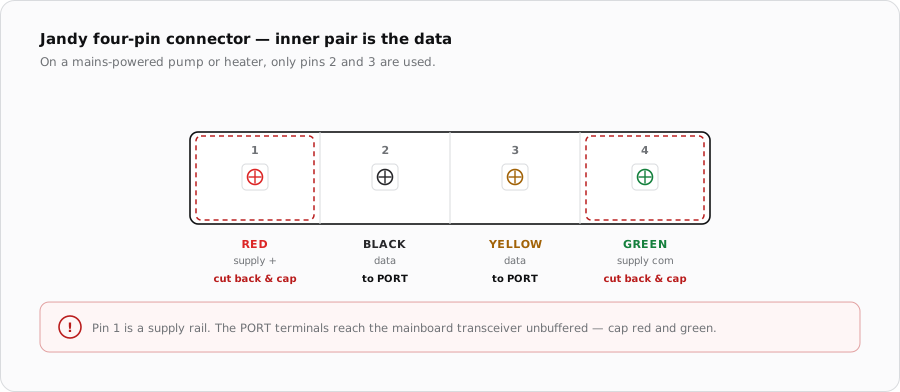
| Pin | Colour | Purpose | iSmart Module |
|---|---|---|---|
| 1 | Red | Supply positive | Not connected |
| 2 | Black | Data | PORT terminal A |
| 3 | Yellow | Data | PORT terminal B |
| 4 | Green | Supply common | Not connected |
Dry contact at the Power Interface Board
The simpler route puts two wires on the heater's Power Interface Board at the terminals marked POOL and COMMON, on J6. Closing a contact across them calls for heat. Drive it from H1 or H2 using COM and N.O so the contact rests open and the heater cannot fire while the module is unpowered.
- 1
Wire POOL and COMMON
At the Power Interface Board, land two conductors on the POOL and COMMON terminals of J6, and take the other end to COM and N.O on a heater output.
- 2
Set the heater's own thermostat to maximum
Set the pool thermostat to 104 F. In this mode the module decides when heat is wanted, so the heater's own setpoint must not be the thing that limits it.
- 3
Open the installer menu
At the heater's user interface, hold MENU, POOL and SPA together for seven to ten seconds.
- 4
Set Remote to T-Stat
Change the Remote setting to Remote T-Stat so the heater expects a thermostat closure on J6. Press the POOL button to exit.
- 5
Prove the contact
Call for heat from the app. The heater should begin its ignition sequence within a few seconds. Drop the call and confirm it shuts down.
Installer settings that affect automation
The same hidden menu — MENU, POOL and SPA held together — carries several settings that change how the heater behaves under an external controller. These are worth checking at commissioning rather than discovering later.
| Setting | Options | Why it matters |
|---|---|---|
| Remote | Off / Hi-Lo-Com / Remote T-Stat | Selects how the heater expects to be commanded. Off ignores external control. |
| Maintain Temp | Disable / Enable | Enabled, the heater works to hold temperature on its own — which competes with the module's scheduling. |
| Maintain Temp Delay | 0:00 to 2:00 hours | How long it keeps doing so. Only relevant if Maintain Temp is enabled. |
| Water Temp Diff | +1 to +5 degrees | The heater's own hysteresis. Set it deliberately against the module's differential so the two do not short-cycle the burner. |
| Freeze Protect | Off / On (34-42 degrees) | Decide whether freeze protection lives here or in the module. Two independent freeze strategies is worse than one. |
| Water Temp Cal | Plus or minus 4 F | Calibration offset. If the app and the heater disagree on temperature, check this before assuming a sensor fault. |
Diagnostics on the heater itself
The installer menu also exposes a Last Fault entry and a Statistics screen showing gas valve run time in hours and the number of times the heater has fired. On a dry-contact installation these are the only fault history you get, since the contact carries no information back. Worth reading before replacing anything.
When it does not fire
| Symptom | Where to look first |
|---|---|
| Contact closes, nothing happens | Remote still set to Off. On this heater that is the most likely cause, ahead of any wiring check. |
| Fires but stops short of setpoint | The heater's own thermostat was left below maximum in T-Stat mode. |
| Heater runs constantly | Contact wired across N.C instead of N.O, or a link left on J6. |
| Short-cycling | Water Temp Diff fighting the module's differential, or Maintain Temp left enabled. |
| RS-485 wired but silent | Swap black and yellow, cycle power, then confirm nothing else shares the PORT. |
| App and heater disagree on temperature | Water Temp Cal offset on the heater. |
| Fires then locks out | The heater's own flow and limit devices. Read Last Fault in the installer menu. |
Sources
- Jandy Pro Series JXi Pool & Spa Heater Workbook (Zodiac Pool Systems) — both connection methods, the POOL/COMMON terminals on J6, the Remote T-Stat procedure, and the end user and installer menu trees
- Jandy Pro Series VS FloPro Installation & Operation Manual — the four-pin connector positions 1-red, 2-black, 3-yellow, 4-green used across the Jandy range
- iSmart Module relay driver board — KiCad schematic and BOM. PORT A-D are an unbuffered RS-485 pass-through; H1/H2 are optocoupled dry relay contacts