
AquaRite S3 — RS-485 connection
The AquaRite S3 carries RS-485 on its main board, so it joins the iSmart Module on the same kind of three-wire run as the pumps. The care needed here is in what you leave unconnected, and in deciding which controller owns the equipment the S3 can also drive.
Check which AquaRite you actually have
This guide is for the S3 generation. The S3's main board has an RS-485 connector on it from the factory, so nothing needs adding to talk to it. Earlier AquaRite units do not — they need Hayward's AQR Communication Board, a daughter board fitted inside the unit, before they can join a bus at all. If you are looking at a pre-S3 AquaRite, stop here: the wiring below will not apply.
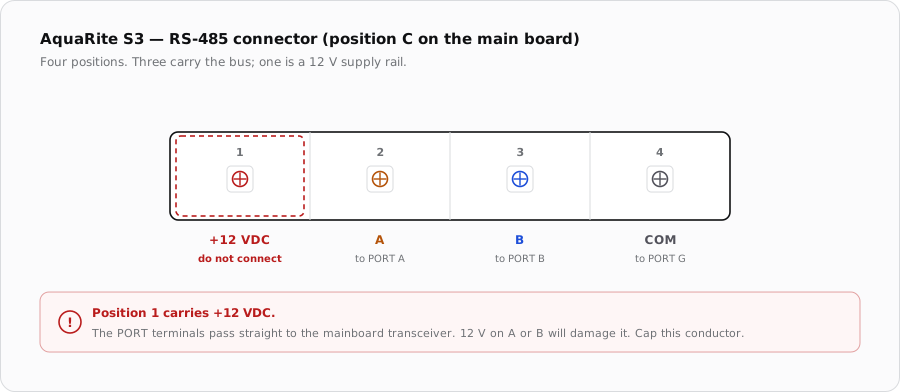
On the S3 main board the RS-485 port is the connector Hayward labels “C” in its service documentation, described as a standard Hayward RS-485 (HPN) connector. It is a four-position header and follows the same convention as the rest of the Hayward line.
The pin mapping
| Position | Signal | iSmart Module | Connect? |
|---|---|---|---|
| 1 | +12 VDC | — | No — leave unconnected |
| 2 | A | A | Yes |
| 3 | B | B | Yes |
| 4 | COM | G | Yes |
Which PORT it goes on
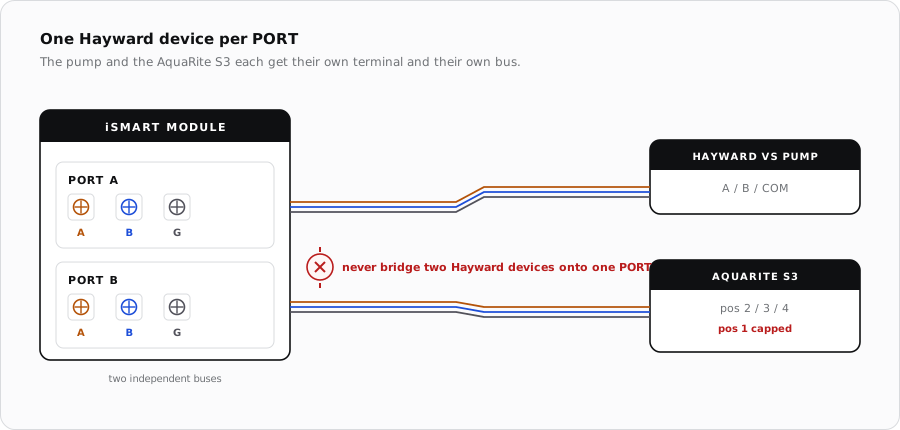
The S3 is a Hayward device on an RS-485 bus, so everything on the pump page applies. Land it on PORT A or PORT B, and give it a PORT of its own: if a Hayward pump is already on PORT A, the S3 goes on PORT B.
Cable
- Same spec as the pump run: 22–24 AWG shielded, with A and B as the two halves of one twisted pair.
- Carry COM on a third conductor. Do not use the shield as the COM connection.
- Ground the shield at the iSmart Module end only.
- Keep it out of conduit shared with pump or cell power wiring.
- Daisy-chain rather than spurring, and terminate externally on a long run — the relay board fits no termination or bias resistors.
Deciding who owns what
This is the part that matters more than the wiring. The AquaRite S3 is not only a chlorinator — its main board also carries its own low-voltage dry contact heater relay, its own pool, air and cover sensor inputs, and the ability to run a filter pump on a schedule. Every one of those overlaps something the iSmart Module does.
| Function | AquaRite S3 can do it | Recommended owner |
|---|---|---|
| Filter pump schedule | Yes, if configured to control the pump | iSmart Module — it already holds the pump on RS-485 |
| Heater call | Yes, via its own dry contact relay | iSmart Module — one heat call, one contact |
| Water / air temperature | Yes, via its own sensors | Either, but only one should drive logic |
| Chlorine output | Yes | AquaRite S3 — this is its job |
When it does not come up
| Symptom | Where to look first |
|---|---|
| No communication at all | A and B swapped, which is harmless and the usual cause. Then confirm the S3 is an S3 and not a pre-S3 unit missing its communication board. |
| Mainboard port dead after wiring | Position 1 was landed on a data terminal. That is the 12 V rail, and the damage is to the module, not the S3. |
| Works alone, fails once the pump is connected | Both Hayward devices are on one PORT. Split them. |
| Chlorinator ignores the schedule | Ownership overlap — the S3 is still configured to run its own pump schedule. |
| Reported salt reads oddly after start-up | Not a wiring fault. The S3 needs flow and a settling period before its salt reading is meaningful. |
Sources
- Hayward, AquaRite S3 Technical Training Guide (TSG-AQRS3b) — main PCB layout, RS-485 (HPN) connector, on-board heater dry contact relay and sensor inputs
- Hayward, TriStar VS Technical Training Guide (TSG-HCPSSa) — the A/B/COM pin convention on Hayward's four-pin RS-485 ports
- Hayward, AQR Communication Board How-To Guide (HTG-AQRDBa) — 12 VDC across positions 1 and 4, and the daughter board required by pre-S3 AquaRite units
- iSmart Module relay driver board — KiCad schematic, “RS485 Pass Through” sheet (PORT A–D unbuffered to the mainboard, no protection or termination fitted)